How to Check If ChatGPT Can Crawl Your Website
To check if ChatGPT can crawl your site, verify that your robots.txt file doesn’t block OAI-SearchBot, confirm important pages return a successful HTTP response, and rule out firewall, CDN, or bot-protection rules that might block the crawler separately from robots.txt. If a page loads normally for a browser but returns an error, a login wall, or a block for automated requests, OAI-SearchBot likely can’t reach it. Passing these checks makes a page technically accessible; it does not guarantee ChatGPT will cite or surface it.
The Short Answer: Can ChatGPT Crawl Your Site?
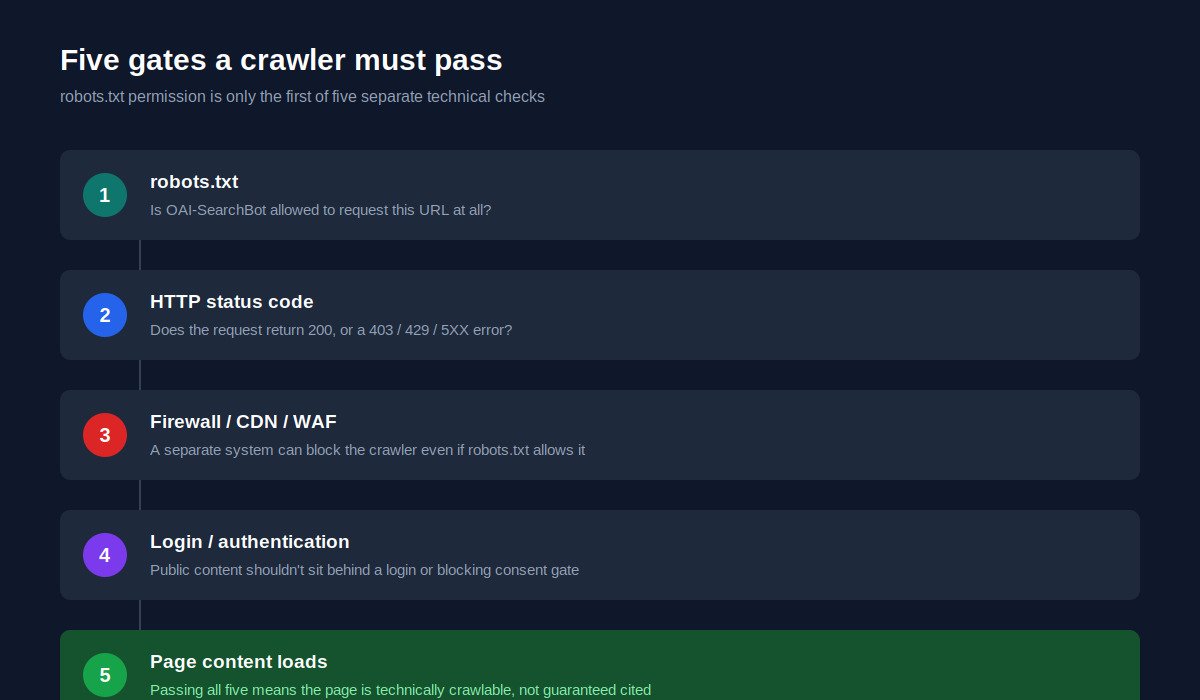
A website is technically crawlable by ChatGPT’s search system when several conditions are true at once. OAI-SearchBot isn’t blocked in robots.txt. The page is publicly accessible without a login. The server returns a successful response rather than an error or redirect loop. Security systems (firewalls, CDNs, bot-mitigation tools) aren’t silently blocking the crawler even though robots.txt allows it. And the content itself loads without requiring JavaScript execution the crawler can’t complete or a challenge (like a CAPTCHA) it can’t solve.
Each of these is a separate technical gate. A site can pass one and fail another, which is why checking robots.txt alone isn’t sufficient. The rest of this guide walks through each gate individually.
What Is OAI-SearchBot?
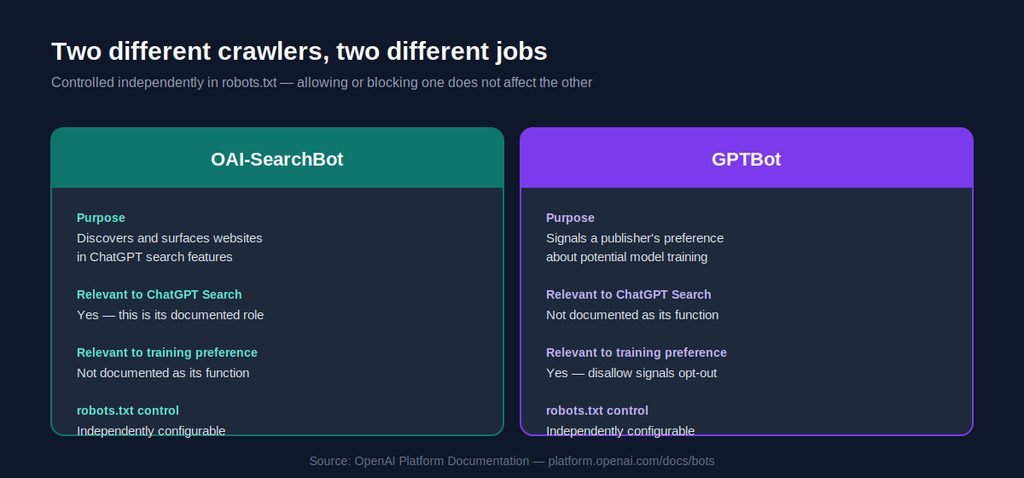
OAI-SearchBot is the crawler OpenAI uses specifically to discover and surface websites in ChatGPT’s search features. According to OpenAI’s own crawler documentation, it operates independently from GPTBot, which serves a different purpose related to potential model training.
OpenAI’s Publisher FAQ states plainly that any public website can appear in ChatGPT search, and that for a site’s content to be included in summaries and snippets, publishers need to make sure they aren’t blocking OAI-SearchBot. OpenAI’s crawler overview documentation also confirms that OAI-SearchBot respects robots.txt directives.
It’s worth being precise here: OAI-SearchBot’s documented role is discovery and surfacing for search, not training. Whether or how specific content influences a specific generated answer is a separate question from whether the crawler can access the page at all. This article focuses on the access question.
OAI-SearchBot vs GPTBot: What’s the Difference?
These two crawlers are frequently confused, and the confusion leads to bad advice. They serve different purposes and are controlled independently in robots.txt.
| Crawler | Purpose | robots.txt control | Relevant to ChatGPT Search | Relevant to training preference |
|---|---|---|---|---|
| OAI-SearchBot | Discovers and surfaces websites in ChatGPT’s search features | Yes, independently configurable | Yes, this is its documented role | Not documented as its role |
| GPTBot | Signals a publisher’s preference about content used for potential model training | Yes, independently configurable | Not documented as its role for search surfacing | Yes, disallowing it signals a site should be excluded from potential training |
The practical implication: disallowing GPTBot does not, according to OpenAI’s own documentation, block a site from ChatGPT search visibility, because that’s not GPTBot’s documented function. Conversely, allowing GPTBot is not documented as something that helps a site appear in ChatGPT search results. The two settings should be treated as separate decisions with separate purposes, not two versions of the same switch.
How to Check If ChatGPT Can Crawl Your Website
1. Check Your robots.txt File
Every public site has a robots.txt file at a predictable location: https://example.com/robots.txt. Open it directly in a browser to see the current rules.
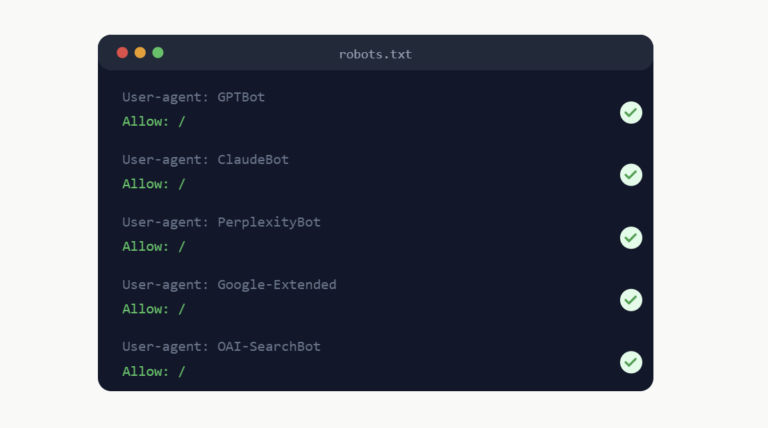
Example: OAI-SearchBot explicitly allowed
User-agent: OAI-SearchBot
Allow: /
Example: OAI-SearchBot explicitly blocked
User-agent: OAI-SearchBot
Disallow: /
A general wildcard rule can also affect this crawler even without a bot-specific entry. For example:
User-agent: *
Disallow: /
This blocks all crawlers that honor robots.txt, including OAI-SearchBot, unless a more specific User-agent: OAI-SearchBot rule overrides it.
If a site already has a permissive wildcard rule (User-agent: * with Allow: / or no disallow rules for relevant paths), there’s no technical need to add an OAI-SearchBot-specific entry just for the sake of it. Adding one is only necessary to create an exception, either allowing OAI-SearchBot when the general rule blocks it, or blocking it when the general rule allows it.
2. Check the Page Returns HTTP 200
robots.txt controls permission. The HTTP status code determines whether the request actually succeeds. A crawler requesting a page can encounter several outcomes:
- 200 (OK): The page loaded successfully. This is what you want for any page meant to be discoverable.
- 301/302 (redirect): The crawler is sent elsewhere. Not inherently a problem, but redirect chains or loops can prevent a crawler from ever reaching the final content.
- 403 (Forbidden): The server actively refused the request, often due to a firewall or bot-protection rule rather than robots.txt.
- 404 (Not Found): The page doesn’t exist at that URL.
- 429 (Too Many Requests): The server is rate-limiting the crawler. Repeated 429 responses can prevent reliable access even if the page itself is fine.
- 5XX (Server Error): Something failed on the server side, unrelated to the crawler’s permissions.
A page can be fully allowed in robots.txt and still be unreachable if it returns a 403, a repeated 429, or a server error.
3. Check CDN, Firewall, and Bot Protection
This is the step most sites overlook. robots.txt is a voluntary instruction that well-behaved crawlers choose to follow. It has no technical enforcement mechanism. A separate, unrelated system, your CDN, firewall, or hosting security layer, can block a crawler at the network level regardless of what robots.txt says.
Common sources of this kind of block include Cloudflare’s bot management settings, Akamai and similar edge security platforms, WordPress security plugins with aggressive bot-blocking defaults, hosting-provider firewalls, and general web application firewall (WAF) rules. CAPTCHAs and JavaScript challenges designed to filter out non-human traffic can also stop a crawler that doesn’t execute JavaScript or solve interactive challenges, even when robots.txt explicitly allows it.
This means a site owner can correctly configure robots.txt, confirm 200 responses in a browser, and still have the page effectively unreachable by OAI-SearchBot because of an unrelated security layer. Checking server logs, or a CDN’s bot traffic dashboard, for OAI-SearchBot requests and their outcomes is the most reliable way to catch this.
4. Check Login and Authentication Requirements
Any page meant to be publicly discoverable shouldn’t sit behind a login wall, a mandatory account creation step, or an authentication flow the crawler has no way to complete. This seems obvious for paywalled or account-only content, but it’s worth auditing pages that seem public but are functionally gated, for example, a page that technically loads but immediately redirects unauthenticated visitors elsewhere.
Cookie-consent implementations deserve a careful look too. A simple cookie notice banner that doesn’t block page content is generally fine. A consent gate that prevents the underlying content from rendering until a user interacts with it is a different, more serious problem, since a crawler that doesn’t click “accept” may never see the actual content.
5. Check noindex Directives
robots.txt and the noindex directive control two different things, and conflating them causes real problems. robots.txt controls whether a crawler is permitted to request a page at all. noindex is an instruction, delivered via a meta tag or an X-Robots-Tag HTTP header, telling a system not to index or surface a page it has already been able to access.
This distinction matters directly for ChatGPT Search specifically. OpenAI’s documentation notes that if a disallowed page’s URL is obtained through another route (a third-party search provider, or by crawling other pages that link to it) and there are signals it’s relevant to a query, ChatGPT Atlas may still surface just the link and page title. If a publisher wants to prevent even that limited surfacing, OpenAI’s guidance points to using a noindex meta tag instead of relying on robots.txt disallow rules alone.
Critically, a crawler needs to be allowed to access a page in order to read a noindex tag on it. A page blocked entirely in robots.txt never gets crawled, which means the noindex tag on that page is never seen in the first place. If the goal is genuinely to keep a page out of ChatGPT search results, noindex on an accessible page is the documented, reliable mechanism, not a robots.txt block.
Never apply noindex to pages you actually want discoverable. This sounds obvious, but noindex tags left over from staging environments or applied broadly by a security or SEO plugin are a common, easy-to-miss cause of pages quietly disappearing from any kind of search visibility.
6. Check Canonical and Indexability Signals
Clean canonicalization supports reliable crawling generally, even though traditional search indexability and AI search selection are not the same thing. Self-referencing canonical tags on unique pages, no conflicting canonical signals pointing different systems to different “true” versions of a page, minimal duplicate content across near-identical URLs, and redirects that resolve cleanly (rather than chaining or looping) all reduce ambiguity for any crawler trying to understand a site’s structure.
This is standard technical SEO hygiene. It doesn’t specifically guarantee anything about ChatGPT, but a site with messy, conflicting indexing signals makes the job harder for every crawler that visits it, OAI-SearchBot included.
7. Check Internal Linking
Pages with no internal links pointing to them, often called orphan pages, are harder for any crawler to discover through normal crawling, even if they’re technically allowed and accessible. A clear internal linking structure gives crawlers a path to important pages rather than relying solely on sitemap discovery.
This is part of the same foundational work covered under technical SEO services: making sure a site’s architecture actually connects its important pages to each other in a way both search engines and AI crawlers can follow.
8. Check XML Sitemaps
A sitemap gives crawlers a direct list of URLs a site considers important, which can improve discovery, particularly for larger sites or pages with few internal links pointing to them. A sitemap improves the odds a URL gets found; it doesn’t guarantee that URL will be crawled, indexed, or surfaced anywhere. Keep it current, and include the public pages actually meant to be discoverable, not every URL a site happens to generate.
9. Test Important Pages Individually
Crawlability issues are often page-specific rather than site-wide. A homepage might be perfectly accessible while a key service page is accidentally blocked by a more specific robots.txt rule, or a product category page sits behind a broken redirect. Rather than assuming site-wide status, check the pages that actually matter for discovery:
- Homepage
- About page
- Main service or product pages
- Product or category pages (for e-commerce)
- Important guides or resource content
- Contact page
Not every page on a site needs to be publicly crawlable. Internal tools, staging content, account dashboards, and similar pages are reasonably kept inaccessible. The goal is making sure the pages a business actually wants discovered are the ones passing every check above.
A Practical AI Crawlability Checklist
| Check | Healthy State | Potential Problem |
|---|---|---|
| robots.txt | OAI-SearchBot allowed (explicitly or via permissive wildcard rule) | Blocked by a specific or wildcard Disallow rule |
| HTTP response | Consistent 200 on important pages | 403, repeated 429, or 5XX errors |
| WAF/CDN | Crawler requests pass through without being challenged or blocked | Bot-protection rules block the crawler despite robots.txt allowing it |
| Authentication | Public content loads without login | Important content sits behind a login or blocking consent gate |
| noindex | Present only on pages genuinely meant to stay out of search/AI surfaces | Accidentally applied to pages meant to be discoverable |
| Canonical | Clear, self-referencing, non-conflicting | Conflicting canonicals or unresolved duplicate URLs |
| Internal linking | Important pages reachable through site navigation and contextual links | Orphan pages with no inbound internal links |
| Sitemap | Current, includes important public pages | Missing, outdated, or excludes pages meant to be found |
| Server errors | Stable hosting, no recurring 5XX | Frequent server errors during crawl attempts |
| Page content | Loads without requiring JavaScript execution the crawler can’t complete | Content only renders after complex client-side interaction |
Example robots.txt Configurations for OAI-SearchBot
Scenario 1: Allow all compliant crawlers generally
User-agent: *
Allow: /
This permits OAI-SearchBot along with other standards-compliant crawlers, without a bot-specific rule. No additional OAI-SearchBot entry is required here unless you want an exception to this general rule.
Scenario 2: Explicitly allow OAI-SearchBot alongside a more restrictive general policy
User-agent: OAI-SearchBot
Allow: /

User-agent: *
Disallow: /some-private-section/
Useful when a site wants to guarantee OAI-SearchBot access to everything public, while applying more specific restrictions to other crawlers or sections.
Scenario 3: Block OAI-SearchBot specifically
User-agent: OAI-SearchBot
Disallow: /
This is a deliberate choice to exclude a site from ChatGPT search discovery, while potentially still allowing other crawlers under separate rules. This is a legitimate option for publishers with specific content or licensing concerns; it isn’t a mistake to correct, just a deliberate decision with a real tradeoff.
Should You Allow OAI-SearchBot?
There’s a genuine decision here, not a universally correct answer.
Reasons a business might choose to allow it: eligibility for discovery within ChatGPT’s search features, the possibility of appearing in AI-generated summaries or snippets, potential citation or link visibility when ChatGPT references sources, and referral traffic from users who click through from a ChatGPT search result to the actual website.
Reasons a publisher might choose to restrict it: specific content-licensing concerns, a deliberate content distribution strategy that doesn’t include AI search surfaces, or internal policy decisions about how content should and shouldn’t be reused or referenced by third-party systems. These are legitimate considerations, not oversights, and the right choice depends on a business’s specific priorities.
Does Allowing OAI-SearchBot Guarantee ChatGPT Visibility?
No. Allowing the crawler removes a technical barrier; it does not determine whether, how often, or in what context a page gets referenced in a generated answer.
Whether content actually gets used in a specific ChatGPT response still depends on factors like relevance to the query being asked, the usefulness and clarity of the content itself, the broader context OpenAI’s systems are working with, and how ChatGPT’s underlying search and generation systems evaluate available sources for a given question. None of these downstream factors are fully documented by OpenAI in a way that allows for reliable prediction or guarantee, and no credible SEO or GEO provider, including Verixo SEO, can promise a specific citation, ranking, or placement in ChatGPT.
Crawlability is the floor, not the ceiling.
Not sure whether AI crawlers can actually access your site? Verixo SEO can review your robots.txt, indexing controls, crawler accessibility, site architecture, entity signals, and current AI visibility services opportunities.
How to Improve ChatGPT Search Discoverability Beyond Crawlability
1. Publish Useful, Original Content
Content built on original research, direct professional experience, genuine case studies, and practical, specific guidance stands apart from generic material that could have been written by anyone. This matters for the same underlying reason it matters in traditional SEO: systems (and readers) favor content that adds something beyond what’s already widely available.
2. Strengthen Entity Clarity
Clear Organization information, a genuine About page, named founders or authors, and consistent brand naming across a website and its external profiles all help any system, human or automated, correctly understand who’s publishing content and why it should be trusted. Relevant structured data can support this as a secondary signal.
Verixo SEO’s AI Visibility & GEO services cover this kind of entity and content review directly.
3. Improve Technical SEO
Crawlability is one piece of a broader technical foundation that includes site speed, mobile usability, clean architecture, and the absence of the kinds of errors covered throughout this guide. This foundational work is the core of Verixo’s technical SEO services.
4. Build Authority and External References
Genuine backlinks, brand mentions, and third-party validation contribute to how any search or AI system understands a site’s relevance and trustworthiness within its subject area. Verixo’s link building services focus on earned, editorial placements rather than manufactured signals.
5. Answer Important Questions Clearly
Structuring content so it directly and clearly answers real questions, rather than burying the point under a long introduction, supports both readability and the kind of extractable clarity that answer-focused search experiences tend to favor.
How to Track Traffic From ChatGPT
According to OpenAI’s Publisher FAQ, publishers who allow OAI-SearchBot can track referral traffic from ChatGPT using standard analytics platforms like Google Analytics. ChatGPT automatically appends the UTM parameter utm_source=chatgpt.com to referral URLs, which supports identifying and analyzing this traffic.
A simple GA4 workflow to check this:
Reports → Acquisition → Traffic acquisition → search or filter for “chatgpt.com”
This shows sessions where chatgpt.com appears as a source. It’s also worth manually spot-checking referral data or server logs for the utm_source=chatgpt.com parameter, since dashboard filtering and default channel grouping can sometimes categorize this traffic differently depending on a site’s specific analytics configuration. Not every ChatGPT-driven visit will necessarily appear identically across every analytics setup, particularly if a site uses custom channel groupings or a different analytics platform than GA4.
Why ChatGPT Referral Traffic Should Be Measured Against Conversions
Raw referral counts or a general sense of “getting cited” are weak indicators on their own. What matters more is what that traffic actually does once it arrives: form submissions, lead generation events, completed purchases, engaged sessions on important pages, and whether visitors from this source land on pages actually built to convert them into a customer or lead.
A site that gets modest ChatGPT referral traffic but converts a meaningful share of it is doing better than one with a larger volume of visits that immediately leave. Treating this channel the same way you’d evaluate any other traffic source, by outcome rather than by volume alone, gives a much more honest picture of whether it’s worth further investment.
Common ChatGPT Crawlability Problems
The most frequent issues that prevent OAI-SearchBot from reliably accessing a site: a direct robots.txt block (specific or via an overly broad wildcard rule), a 403 response from a firewall or WAF unrelated to robots.txt, repeated 429 rate-limiting responses, recurring 5XX server errors, a noindex tag mistakenly applied to pages meant to be discoverable, content sitting behind a login requirement, bot challenges like CAPTCHAs blocking automated access entirely, broken or looping redirects, orphan pages with no internal links pointing to them, incorrect or conflicting canonical tags, and, where relevant, blocked assets that prevent a page’s content from rendering or being understood correctly.
Common Myths About ChatGPT Crawling
Myth: You must allow GPTBot to appear in ChatGPT Search.
Not accurate based on OpenAI’s documentation. GPTBot’s documented role relates to potential training use, not search surfacing. OAI-SearchBot is the crawler documented as relevant to ChatGPT search visibility.
Myth: OAI-SearchBot access guarantees citations.
No. Crawl access is a technical prerequisite, not a guarantee of any specific outcome. Relevance, content quality, and OpenAI’s underlying systems still determine whether and how content gets referenced.
Myth: llms.txt is required for ChatGPT Search.
This isn’t documented by OpenAI as a requirement for search crawling or citation eligibility. The mechanisms OpenAI documents for search access are OAI-SearchBot permissions and robots.txt, not a separate llms.txt standard.
Myth: Schema guarantees AI visibility.
Structured data can help clarify entity and content information, but no major AI platform, including OpenAI, documents specific schema markup as a guarantee of citation or visibility.
Myth: A website indexed in Google is automatically optimized for ChatGPT.
These are separate systems with separate crawlers and separate access controls. Google indexing has no documented bearing on whether OAI-SearchBot can or does access a site.
Myth: AI crawlers ignore robots.txt.
OpenAI’s documentation states OAI-SearchBot respects robots.txt. Compliance is voluntary by design across the industry, meaning it depends on the crawler operator’s stated behavior rather than a technical enforcement mechanism, but OpenAI documents OAI-SearchBot as compliant.
ChatGPT Crawler FAQs
What crawler does ChatGPT Search use?
OAI-SearchBot is the crawler OpenAI documents as responsible for discovering and surfacing websites in ChatGPT’s search features.
What is OAI-SearchBot?
It’s OpenAI’s dedicated crawler for search-related website discovery, used to help surface relevant sites in ChatGPT search results and, where applicable, summaries and citations.
Is OAI-SearchBot the same as GPTBot?
No. They’re documented as separate crawlers with separate purposes: OAI-SearchBot for search discovery, GPTBot for signaling training-content preferences. They’re controlled independently in robots.txt.
How do I allow ChatGPT to crawl my site?
Ensure your robots.txt file doesn’t block OAI-SearchBot (via a specific or general wildcard rule), confirm important pages return successful HTTP responses, and check that firewalls, CDNs, or bot-protection tools aren’t blocking the crawler separately from robots.txt.
Can I block ChatGPT Search?
Yes. Disallowing OAI-SearchBot in robots.txt is a documented, legitimate way to exclude a site from ChatGPT search discovery.
Does ChatGPT respect robots.txt?
According to OpenAI’s documentation, OAI-SearchBot respects robots.txt directives.
Does ChatGPT use noindex?
OpenAI’s guidance points to the noindex meta tag as the mechanism for preventing a page from being surfaced, even in limited link/title form, when its URL is discovered through other means. The crawler must be able to access the page to read that tag.
How can I track ChatGPT referral traffic?
Through standard analytics platforms like Google Analytics, using the utm_source=chatgpt.com parameter ChatGPT automatically adds to referral links, viewable under acquisition and traffic source reports.
Does allowing OAI-SearchBot improve SEO rankings?
This isn’t documented as a factor in Google or other search engine rankings. OAI-SearchBot access relates specifically to ChatGPT search discovery, a separate system from traditional search engine ranking.
Does crawlability guarantee ChatGPT citations?
No. Crawlability removes a technical barrier to access. Whether specific content gets referenced in a specific answer depends on relevance, content quality, and OpenAI’s underlying systems, none of which crawl access alone determines.
Final Thoughts: Crawlability Is the Technical Starting Point
Checking whether ChatGPT can crawl your website is a necessary first step, not a finish line. robots.txt, HTTP status codes, firewall configuration, authentication requirements, and noindex directives all determine whether OAI-SearchBot can reliably reach your content in the first place.
Passing every check in this guide means a site is technically accessible. It does not mean that site will be cited, referenced, or surfaced in any particular ChatGPT response. That outcome still depends on the same fundamentals that drive visibility everywhere else: genuinely useful content, sound technical SEO, clear entity signals, real authority, and content built to answer the questions people are actually asking.
Check Your Website’s AI Crawlability
We’ll review your website’s technical accessibility, indexing signals, content structure, and AI search visibility opportunities to identify what should be fixed first.